If you ever thought about why tools like KDirStat or QDirStat are not available on Windows, you need to think again. WinDirStat is an all-in-one statistical viewer, disk analyzer, and cleanup tool that can make your Windows look cleaner than ever. Built on the concept of KDirStat, an incredible developer named Bernhard decided to create WinDirStat in 2003. The interface is majorly based on KDirStat but provides some unique functions like the extension list.
The usefulness of WinDirStat is hard to grasp if you are not acquainted with the tool. I was a bit skeptical at first too! However, using it has completely changed my view on how to view my Windows directory and manage everything.
Using WinDirStat
First things first, the installation process is quite easy and it takes roughly less than a minute to get installed. What can I say, I’m easily impressed when a tool does not take too much time to install.
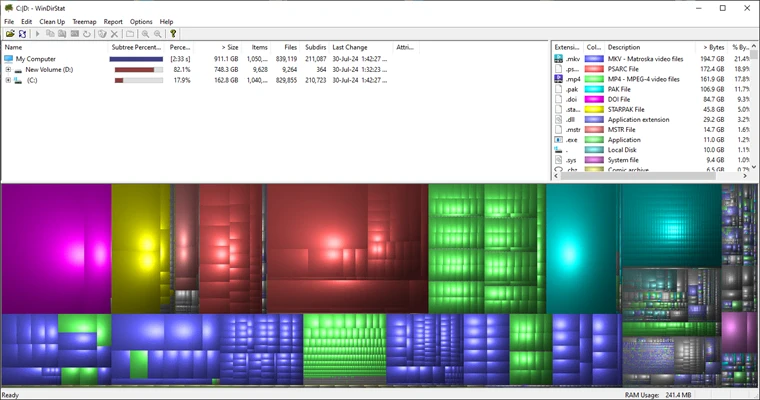
Then, I got to see the main interface. My whole directory was presented in 3 useful views:
Directory list: Windows Explorer but in a tree view structure.
Treemap: Showcases the whole directory in the tree format.
Extension list: Highlights the legends and statistics of the files.
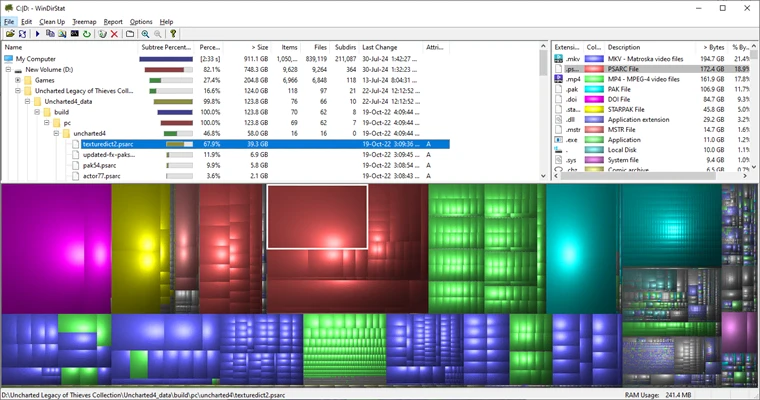
Now, the coolest thing to see is the colored graphical mapping to know what kind of files are taking the most space.
By clicking on the individual boxes, I can even check the whole details of the file directory and choose to do what I want.
This helps me understand more about my local disk at a glance which is hard to identify otherwise.
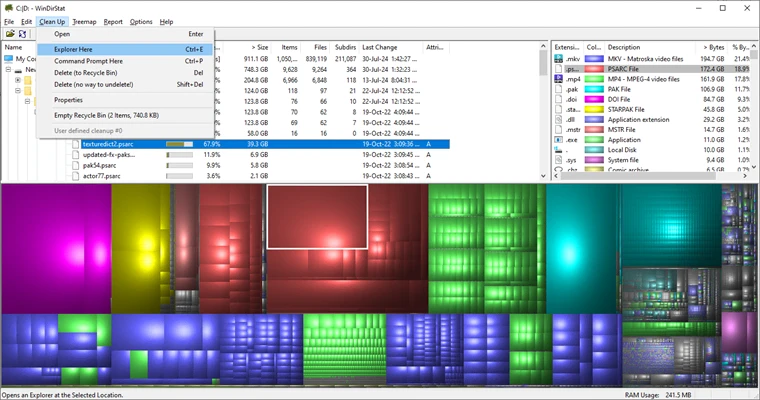
Moreover, to clean my unnecessary files, I just need to tap on the Clean Up button and choose the files. It’s that easy.
I know the tool has some limited functionalities, but I can’t help but appreciate the usefulness it brings to the table. However, you do need to be careful while deleting the files because you won’t get them in the recycle bin.
Bottom Line
Long story short, WinDirStat can be your go-to Windows disk cleaning tool if you ignore the minor drawbacks. Whether your disk drive is struggling on the last gigabytes or infected with pesky files, WinDirStat can clean it all.
So, get a taste of the real potential of your Windows with a clean slate!
An economics graduate who is fascinated by the world of startups and the ever-changing world of SEO....
0
Followers
0
Following
Software Content Writer
An economics graduate who is fascinated by the world of startups and the ever-changing world of SEO. With a vision to bring impactful changes in society, the constant typing on the keyboard continues.
FAQs
Frequently Asked Questions
Yes, you can safely install WinDirStat on your PC without getting affected by any malware. However, be careful while going through your system files.
Yes, you can freely install and use WinDirStat on your Windows PC
Yes, you can run the tool on the latest version of Windows.